
Hi
I have purhased AS FS from Simmarket.
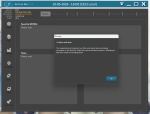
I jumped on to the sim after a week and activeskyfs is not functioning as it should. It downloads data as I can see in the prompt after which is does not populate the data on the s/ware interface. When shut down and restarted, I get a pop up with a warning...(pic uploaded)
I later uninstalled activesky and reinstalled it but no luck. Additional info...I did not uninstall the settings while uninstalling ativeskyfs. I am not sure if that is needed to reinstall the software afresh.
On more thing, the link on activesky website to the latest version of activeskyfs is broken - I am not sure this is my connection or is everyone facing the same issue
On my pc...the ports were as under...
AS_HTTP_PORT - 19284
AS_PIPE_PORT - 445
AS_RADAR_PORT - 19284
I changed them to...
AS_HTTP_PORT - 19285
AS_PIPE_PORT - 445
AS_RADAR_PORT - 19285
No change.
Requesting help.
Regards
Ted
I have purhased AS FS from Simmarket.
I jumped on to the sim after a week and activeskyfs is not functioning as it should. It downloads data as I can see in the prompt after which is does not populate the data on the s/ware interface. When shut down and restarted, I get a pop up with a warning...(pic uploaded)
I later uninstalled activesky and reinstalled it but no luck. Additional info...I did not uninstall the settings while uninstalling ativeskyfs. I am not sure if that is needed to reinstall the software afresh.
On more thing, the link on activesky website to the latest version of activeskyfs is broken - I am not sure this is my connection or is everyone facing the same issue
On my pc...the ports were as under...
AS_HTTP_PORT - 19284
AS_PIPE_PORT - 445
AS_RADAR_PORT - 19284
I changed them to...
AS_HTTP_PORT - 19285
AS_PIPE_PORT - 445
AS_RADAR_PORT - 19285
No change.
Requesting help.
Regards
Ted
Attachments
-
 261.7 KB Views: 5
