Resolved Activ Sky and Parallel SimFX

Yardbird

Member
Hi,

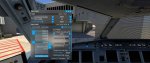
I just noticed something strange. Had some issues with the weather of Ative Sky and went into the MSFS weather settings. Live weather was switched off, which is correct because Active Sky is switching it off to do its own thing , but as it is switched off in the MSFS weather setting it says simfx Cinematic in the presets (that comes from the parallel SimFX addon). Does that have to be set to clear sky preset in order to run Active sky properly?. See Screenshot

Best regards,
Felix
 

Attachments

Bond

Member
Hi,

I just noticed something strange. Had some issues with the weather of Ative Sky and went into the MSFS weather settings. Live weather was switched off, which is correct because Active Sky is switching it off to do its own thing , but as it is switched off in the MSFS weather setting it says simfx Cinematic in the presets (that comes from the parallel SimFX addon). Does that have to be set to clear sky preset in order to run Active sky properly?. See Screenshot

Best regards,
Felix
You should disable all weather addons.
 

Yardbird

Member
You should disable all weather addons.
Hi,

Iam using Parallel SimFX for contrails. Unfortunately those weather presets can not be uninstalled. SimFX is not a weather addon it just has some presets , which are installed as well (I dont use them at all).

Maybe I should rephrase, how does the MSFS weather setting look at your computer when Active Sky is enabled? I guess it says "clear skys"with respect to my screenshot

Best regads,
Felix
 
Last edited:

Matex

New member
You can uninstall them. I just did. Delete "weather" and "weather presets" folders in the SimFX folder. Then use MSFSLayoutGenerator.exe program to update the layout.json (google it, its around the whole community and used very often). Presets will be gone and wont interfere with AS anymore while SimFX still works.
 

einherz

Active member
just ignore it, active sky take first that found of presets and redraw it, i had same, but everything works, before i had simfx, hifi took carrier training weather preset and use it for dynamic set it's own weather.
 

einherz

Active member
to hifi... for avoid that situation with confused guys, would be cool if active sky will take only clear weather preset.
 

damian

Developer
Staff member
We have no known issues with SimFX. Our control should work with any preset with index=1 (first one after live weather). Normally this is clear sky but it shouldn’t matter. If you confirm any issue here please provide confirmation, details and repro steps. Thanks!
 

Yardbird

Member
We have no known issues with SimFX. Our control should work with any preset with index=1 (first one after live weather). Normally this is clear sky but it shouldn’t matter. If you confirm any issue here please provide confirmation, details and repro steps. Thanks!
@damian

Hi,
i can absolutlety confirm that there is interference due to the SIM FX presets. I just tested it again. Weather was absolutely not right at all, also Active Sky was not able to give an interpolated weather condition, the screen was just blank with no entries. Weather also did not change at all.
1. Try: restart active sky - no change
2. Try: changed the preset in MSFS to clear Sky (it automatically chooses that SIMFX cinematic preset by default) , hoping that Active Sky would build the weather up on that preset - no change
3. Try: change dMSFS preset to clear sky, then quit active sky and restart active sky et voila active sky is running properly, also I do now have interpolated weather conditions.

I did not even know that Parallel42 had installed these presets with SIMFX as I said Iam using it for the contrails. Wrote an Email to them that they should make that optional during installation.

EDIT : running the latest build 8927
Best regards,
Felix
 
Last edited:

damian

Developer
Staff member
Thanks for details, we will investigate. We have no other open reports of issues with SimFX and have confirmation from a few that there are no problems, so there is likely something specific here not affecting everyone.
 

Daveo

Community Manager
Staff member
I can confirm this with latest beta build.
Seems the latest SimFX is clearing out the skies.
After removing it from the Community Folder and restarting MSFS conditions seem to be back to normal depiction.

This is definitely playing with the presets.
 
Last edited:

JPl19

New member
Having similar issue with SimFX - I specifically started my flight with live weather, but, it is being changed to //42 SimFX-Cinematic. Even if I change it in sim (in flight) it changes back to the same SimFX setting. Sent//42 a ticket...
 

JPl19

New member
Seeking some clarity - I received a response from //42 saying this is an HiFi issue.
Thank you for that, this is a change that Hi-Fi will need to put into place and we have reached out for cooperation. There are plenty of presets out there that use a name higher in the alphabet than CLEAR SKIES.
We see that DC has already acknowledged the issue in the forum and will close this ticket based on it being acknowledged.

Just asking so I know where to watch for solutions . . .
 

Yardbird

Member
Having similar issue with SimFX - I specifically started my flight with live weather, but, it is being changed to //42 SimFX-Cinematic. Even if I change it in sim (in flight) it changes back to the same SimFX setting. Sent//42 a ticket...
@JPl19

Here is the way how I do it:

1. Start MSFS (dont start active sky yet)
2. Then Start your flight
3. Once you are at the gate go in the top menu to weather disable live weather (then it switches to simfx cinematic preset) then choose clear sky preset
4. then start Active sky and everything works from there.

Best regards,
Felix
 

MMATGA2ME99

New member
Seeking some clarity - I received a response from //42 saying this is an HiFi issue.
Thank you for that, this is a change that Hi-Fi will need to put into place and we have reached out for cooperation. There are plenty of presets out there that use a name higher in the alphabet than CLEAR SKIES.
We see that DC has already acknowledged the issue in the forum and will close this ticket based on it being acknowledged.

Just asking so I know where to watch for solutions . . .
LOL, just because they do it, doesn't mean it's the right way of doing it. It will just be another //42 I do not purchase, that is my solution.
 

damian

Developer
Staff member
As mentioned we are investigating. We don't yet confirm that this is something we are doing wrong or incorrectly, but obviously there is a "new" interaction issue that didn't exist until SimFX new update. If we can do something to "fix" on our end or work around the interaction issue, we will. Thanks.

Update: We've confirmed it's because of the ordering of the presets and the different preset style used in SimFX which is not expected by ASFS until now. We're working on a redesign regarding preset selection and control and will plan to roll this out with our next update, open beta expected in next week or two. Thanks for your patience.
 
Last edited:

Yardbird

Member
@damian

Running the latest Beta. So far everything looks ok I think this can be considered as fixed. It automatically chooses the active sky preset and SimFX does not interfere as far as I can tell. Thx

Best regards,
Felix
 
Top