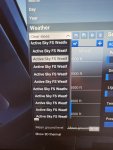
'Active Sky FS Weather Preset' stays in FS weather menu

unairspace

New member
Hi,

When I scroll down the weather preset menu I see a lot of (30 maybe) 'Active Sky FS Weather Preset' which can be select individually. Are those previous presets injected by ASFS? Can I delete them or can they be deleted? Build 9435.
 

Attachments

Daveo

Community Manager
Staff member
B9495 has been officially posted which resolves some issues which can result in weather clearing and also automatically clears any duplicates on startup.
 
Last edited by a moderator:

Daveo

Community Manager
Staff member
I always start Active Sky first.

Open a ticket if you want so we could look into this further.
 

damian

Developer
Staff member
When you press ESC while transitions are active, the new MSFS 2024 SU4 build can constantly write and auto save the changes to the updated preset using a unique number. We cannot affect this behavior, unfortunately. ASFS latest build does clear any duplicates on startup, so we would recommend starting ASFS first if you would like a clean slate on sim startup.
 

mmcmah

Active member
I am finding that version 9495 still doesn't clear out the existing duplicates. Is there a folder location in MSFS 2024 where I can manually delete all of the old ASFS presets rather than having to do it individually through the weather preset selection screen? I have many, many leftover presets.
 

mmcmah

Active member
Never mind - found the folder location: \Users\USERNAME\AppData\Local\Packages\Microsoft.Limitless_8wekyb3d8bbwe\LocalState\Weather\Presets

But they aren't being deleted by the ASFS app, despite starting it before the simulator.
 

mmcmah

Active member
What is the right procedure for trying to ensure that these presets actually get cleared? I have gone through again and deleted another 500+ presets that had accumulated again since I last deleted all of them. I start ASFS before the sim. I have tried exiting before the sim and after the sim and I still seem to get an ever-growing number of preset being saved. Is there anything that I should be doing with the ASFS button in the Toolbar menu?
 

Daveo

Community Manager
Staff member
There is probably some other addon causing this or another weather addon is/was installed?
 

damian

Developer
Staff member
Actually, the generation of these presets occurs automatically in the latest MSFS builds due to their new autosaving of any custom weather preset when it's changed and you hit ESC to go to the in-flight menu (hard pause). Likely an oversight/bug in MSFS, as the hard pause status should not affect things, but it does, and while we are in a transition state, sending many small changes multiple times per second, before we are even notified that the hard pause was initiated, these preset saves are generated without our ability to control.

We're trying to figure out a way to prevent them and automatically clear than more dynamically. As things are always rapidly changing between SUs, we're focusing on SU5 now, and this handling is yet again different than later SU4 builds. In short, we're working on it.
 

Daveo

Community Manager
Staff member
FWIW in SU4 I haven't seen this using the "P" key for any pauses.
 
Top