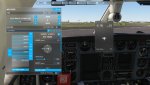
Resolved No variable wind, gusting and windshear

Kristoff

New member
I found a 2 bugs so im just gonna list it here:
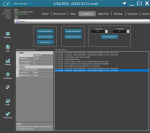
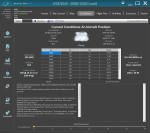
1: The wind is stable and wouldnt change even if im in a windshear and the asfs screaming windshear windshear no gusting or wind variation at all in the simulator at the debug page everything showed as it should be showing the wind changing and everything but in the sim really nothing.
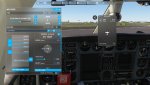
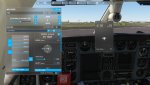
2: I also found a bug with wake turbulence when i create a wake turbulence or just flying online and get in to wake turbulence it beginns an uncontrollable spin of the aircraft
 

maxam

Testing Team
Hi,
  1. Please ensure that in MSFS Metric Hybrid is not enabled. Metric One seems okay. Another report shows that Active Sky "Preset Control" is also affected. Passive mode seems okay.
  2. Adjust turbulence effect scale down for now until you find a sweet spot. The dev's might have to tune this a little.
I will test and report to the dev's.

Thank you for the report.
 

mat18590

New member
I found a 2 bugs so im just gonna list it here:
1: The wind is stable and wouldnt change even if im in a windshear and the asfs screaming windshear windshear no gusting or wind variation at all in the simulator at the debug page everything showed as it should be showing the wind changing and everything but in the sim really nothing.
2: I also found a bug with wake turbulence when i create a wake turbulence or just flying online and get in to wake turbulence it beginns an uncontrollable spin of the aircraft
hi, sorry but it doesn't seem like a bug to me, it also happens in reality, especially if you enter the wake of a large heavy plane, unfortunately people have lost their lives just like that!
today I tried with a small plane to enter the wake of a 737 several times and from afar it was still controllable, up close I actively entered an uncontrolled spin! It's about time an addon added some realism because msfs until now felt more like a game than a simulator
 

Kristoff

New member
hi, sorry but it doesn't seem like a bug to me, it also happens in reality, especially if you enter the wake of a large heavy plane, unfortunately people have lost their lives just like that!
today I tried with a small plane to enter the wake of a 737 several times and from afar it was still controllable, up close I actively entered an uncontrolled spin! It's about time an addon added some realism because msfs until now felt more like a game than a simulator
You are funny i also have as for x plane as well and for some reason there my planes didnt go spinning, like do you if you enter a medium wake turbulence (a320) with a 747 your plane should go ahead and start spinning and fall out of the sky :D
 

Kristoff

New member
were you using the fenix 320? they say it is very sensitive to turbulence
as i said i entered medium wake turbulence which like a320 or 737 has with a 747 default asobo
btw yes i tried wit fenix a320 to and with pmdg 738 both were spinning from just a 1 strength wake turb generated from debug page with a 35% wake turb setting, i think they need to adjust to be a little bit more realistic
 

damian

Developer
Staff member
Regarding wake turbulence: We are looking at all popular add-on aircraft and feedback to adjust this to give more expected results in all situations.

Regarding wind shear/shifts not working right in all cases, this is confirmed, we are working on it. Thank you.
 

DangerZoneDmo

New member
Hello! Where do we stand regarding this issue? I still don’t have gusts or variable wind depicted in sim unless I’m in passive mode. This issue makes my landings far, far too smooth all of the time lol :LOL:. I’ve tried as many things as I can think of to resolve it, but with no luck.
 

damian

Developer
Staff member
Hello! Where do we stand regarding this issue? I still don’t have gusts or variable wind depicted in sim unless I’m in passive mode. This issue makes my landings far, far too smooth all of the time lol :LOL:. I’ve tried as many things as I can think of to resolve it, but with no luck.
We addressed some things in earlier builds related to this and not aware of current issues. Please provide details. Screenshot of conditions screen (no code) along with your log export when you experience the discrepancy (no gusts) would be helpful. Also, if you can, a screenshot of the wx dialog surface wind layer settings shown would be helpful.
 

DangerZoneDmo

New member
We addressed some things in earlier builds related to this and not aware of current issues. Please provide details. Screenshot of conditions screen (no code) along with your log export when you experience the discrepancy (no gusts) would be helpful. Also, if you can, a screenshot of the wx dialog surface wind layer settings shown would be helpful.
Thanks for your reply Damian! I'll do my best to provide you with what you need.Screenshot 2024-05-25 002325.png20240525001515_1.jpgimage.png
 

Attachments

Kristoff

New member
Also from what i saw in the changelogs there was no changes related to windshear or microburst and its still not working with the latest beta build
 

DangerZoneDmo

New member
Also from what i saw in the changelogs there was no changes related to windshear or microburst and its still not working with the latest beta build
Yeah, the winds for me are completely static as well. Even at altitude, the wind will just be a constant speed and direction until a new data reload is performed. I love ASFS, but this is the one major complaint that I have with it so far.

I even sanitized my community folder so that the only thing in there is the “asfs” folder, but no change. I made an exception for it in Windows Defender, and have run it as admin. I always do a full reinstall of ASFS every update as well. Short of trying a full MSFS reinstall, I’m not sure what else I should do to make the gusts work :cry:
 

DangerZoneDmo

New member
Hey Damian, anything else I can do to help figure out how to squash this bug, or determine if it's a local issue on my end? Happy to provide any other data you'd like!
 

Kristoff

New member
Hi Damian!
The wind gusting works beautifully but the windshear and microburst is still not functioning, if you could take a look into that i would appreciate that, thanks.
 

damian

Developer
Staff member
Microburst and windshear test buttons are not providing expected behavior, this is known and will be addressed in the next bigger update. Thanks!
 
Last edited:

DangerZoneDmo

New member
Hello Damian! Unfortunately, for me, there still is no gusting happening within 500ft of the ground. Above that, there's some gusting, but it's very light, and nothing close to the ground or that affects me on final approach. Certainly nothing that matches the METAR. In passive depiction, there are significant gusts at ground level, but not active depiction. Unfortunately, it's late and I can't provide any screenshots or logs tonight, but I'll definitely post some up tomorrow for you. I tried it with a vanilla community folder as well (except for the asfs folder) as completely reinstalling MSFS, but alas, no gusting 😭
 

DangerZoneDmo

New member
I think I may be onto something with this issue. I've found that, within MSFS, when the weather's "Altitude Calculation" is set to AMSL (as it is with ASFS running), there are issues with wind showing up correctly at ground level. When I don't have ASFS running and try to set the winds at ground level myself, it doesn't seem to ever work, regardless of where I set the wind layer. When I set the altitude calculation to AMGL, it works as expected. Attached are some screenshots that show what I'm talking about. I'm not sure what the solution is for ActiveSky, but I think my issue is related to this somehow.

Manual weather set within MSFS, using the AMGL "Altitude Calculation" - Working as intended, wind acting the way I set it.
20240607000152_1.jpg

Manual Weather Set in MSFS, using the AMSL "Altitude Calculation" - Not working as intended (winds stuck at 10 knots), regardless of where I set the wind layer altitude; whether at "WINDS - ground" or "WINDS - 892ft" (like when ASFS sets the wind level).
20240607000236_1.jpg

Custom weather set using ASFS, set for the same (more or less) wind parameters used in the previous two screenshots - not working as intended with no gusting at ground level at all, and with incorrect base wind values. Wind attenuation cancellation makes the base winds correct, but still with no gusting. Additionally, the wind layer level shows 892ft, instead of "WINDS - ground" as it does in the above screen shot. That said, it doesn't seem to matter where the wind layer level is set for me, I still don't see the correct behavior.
20240607000557_1.jpg

I don't know what the solution is here, but it seems that the AMSL vs. AMGL calculation is the source of the issues relating to gusts in the sim for me.
 

damian

Developer
Staff member
The MSFS2020 MSL/AGL calculation "bug" for winds and apparent surface-level attenuation is known, and we have a feature/option that can adjust for this: Enable surface wind attenuation cancelation
 
Top