disco79stu
Member
I'm a bit confused by this setting tbh. How exactly does this work?
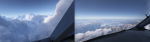
Because I noticed that going from a rather high setting (65 left) with quite some diverse clouds to a rather low setting (35 left) often results in just one overcast layer.
Switching back to a high setting will loosen the clouds again, often even adding additional layers. It's not just changing the clouds density, it's changing the whole depiction.
Also, it seems I can change it three times, after that the clouds won't change anymore, regardless of how I set the slider and apply it to the current weather.
I'm just trying to figure out what density I prefer, and it's kinda hard to tell...
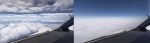
Because I noticed that going from a rather high setting (65 left) with quite some diverse clouds to a rather low setting (35 left) often results in just one overcast layer.
Switching back to a high setting will loosen the clouds again, often even adding additional layers. It's not just changing the clouds density, it's changing the whole depiction.
Also, it seems I can change it three times, after that the clouds won't change anymore, regardless of how I set the slider and apply it to the current weather.
I'm just trying to figure out what density I prefer, and it's kinda hard to tell...
Last edited: