
Hello,
I noticed what seems to be an inconsistency between the weather map and the weather depiction at my aircraft position.
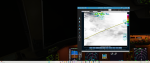
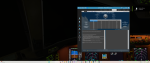
As you can see from the attached screenshots, the map clearly shows my aircraft located within a cloudy area, but the Current Conditions at Aircraft Position window reports “Clear” with no cloud layers and no precipitation.
Could you please explain why there is this difference? Is the map displaying forecast/satellite imagery while the aircraft conditions come from a different weather source or interpolation method?
I would like to understand whether this is expected behavior or if it indicates a problem with the weather depiction.
Thank you very much.
I noticed what seems to be an inconsistency between the weather map and the weather depiction at my aircraft position.
As you can see from the attached screenshots, the map clearly shows my aircraft located within a cloudy area, but the Current Conditions at Aircraft Position window reports “Clear” with no cloud layers and no precipitation.
Could you please explain why there is this difference? Is the map displaying forecast/satellite imagery while the aircraft conditions come from a different weather source or interpolation method?
I would like to understand whether this is expected behavior or if it indicates a problem with the weather depiction.
Thank you very much.
Attachments
-
 2.8 MB Views: 1
 -
 2.5 MB Views: 1
